Cricut Explore 4 Review: Fast Custom Merch and Decal Precision
Julia Ellery 22 Sep 2026 8 min read ASIN B0DVW5MLGF
This product against the Tools & Outdoors median
| Figure | This product | Category median | Where it sits |
|---|---|---|---|
| Buyer score Average star rating left by Amazon buyers, out of 5. | 4.1 / 5 | 4.4 / 5 n=48 | 7% lower than the median |
| Spec fields published How many attributes the seller fills in on the listing. | 4 | 5.0 n=48 | 20% fewer than the median |
Medians are taken across the 48 published reviews in Tools & Outdoors; n on each row is how many of them publish that figure. The notch on every bar marks the median, so a fill reaching past the notch sits above it. Buyer score is the average star rating left by Amazon buyers, not a score from this site.

- Brand
- Cricut
- Buyer score
- 4.1 / 5 average from Amazon buyers
- Spec fields
- 4 attributes on the listing
As Amazon Associates, we earn from qualifying purchases. This means we may receive a small commission at no extra cost to you if you click through and make a purchase.
Customizing a personal gaming battle station, crafting custom team apparel, and cutting precise vinyl decals for PC cases or streaming gear requires dependable mechanical accuracy and speed. The Cricut Explore 4 serves as an automated smart cutting machine built for hobbyists and makers who want to move beyond simple manual trimming into high-precision custom production. With upgraded internal mechanics engineered to cut up to two times faster than previous generations, this unit balances user-friendly software guidance with versatile multi-material fabrication for custom merch, vinyl lettering, and detailed sticker sheets.
Whether your goal is producing esports jerseys with iron-on heat transfer vinyl, laying down intricate wraps for your controllers, or cutting extended wall graphics, choosing the right hardware hinges on handling capabilities, software workflows, and real-world execution. This comprehensive review examines the included bundle accessories, technical hardware specifications, cutting speed benchmarks, matless feeding capabilities, tool versatility, and overall ownership value to determine if this machine belongs on your crafting workbench.
What You Get With the Cricut Explore 4 87 words
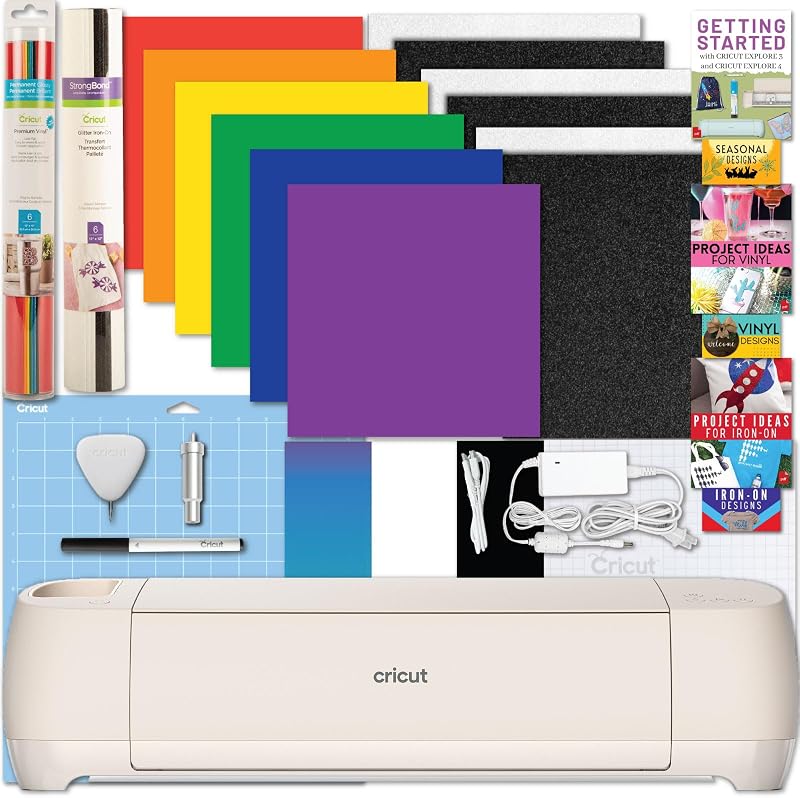
The Cricut Explore 4 bundle ships with an assortment of starter equipment, consumables, and digital resources designed to let creators start fabricating immediately upon unboxing.
- Cricut Explore 4 smart writing and cutting machine
- Fine-Point cutting blade and housing assembly
- Assorted Cricut Vinyl and Iron-on sheets in mixed colors
- Standard Cricut cutting mat for securing smaller stock
- Drawing and writing pen
- Sample materials for completing initial test cuts
- Explore 4 Digital Guide containing an instruction manual, project tutorials, and troubleshooting guidance
- Digital SVG cut files and pre-made project designs
Key Specifications 103 words
Hardware Specification Manufacturer Detail
- Brand
- Cricut
- Model Number
- z20-11070-R9
- Operation Mode
- Automatic
- Dimensions (D x W x H)
- 22.2"D x 7"W x 5.9"H
- Active Surface Area
- 144 square inches
- Material Compatibility
- 100+ materials (vinyl, iron-on, cardstock, felt, leather)
- Maximum Continuous Cut Length
- Up to 12 feet using Smart Materials
- Tool System Support
- 6 compatible tools (cutting, writing, drawing, scoring, foiling)
- Included Media Stock
- Adhesive vinyl and HTV iron-on sheets
- Warranty Coverage
- 1 Year Warranty Against Manufacturer Defects
Fields the seller filled in on the Amazon listing (4)
- Color
- Vinyl and IO Sheets
- Dimensions
- 22.2 x 7 x 5.9 Inches
- Product Group
- Home
- Binding
- Tools & Home Improvement
Cutting Speed and Merch Production Throughput 213 words
Evaluating raw hardware velocity is critical when fulfilling batch orders of custom team apparel or producing inventory for online shops. The Cricut Explore 4 cutting speed is rated up to two times faster compared to previous generations, reducing the mechanical waiting period during multi-layer vinyl plotting. Streamers and gaming groups needing identical logos across hoodies, mousepads, and chassis panels benefit directly from reduced cycle times per piece.
Beyond straight-line velocity, overall Cricut Explore 4 performance relies on smooth curve tracking and dependable corner deceleration. High plotting speeds can sometimes drag thin adhesive film if blade pressure is misaligned, but the automated drive rollers maintain continuous grip across the 144 square inches of active cutting surface area. For makers who might otherwise consider industrial-style hardware like the cricut maker 3 for heavy-density material carving, the Explore 4 isolates its mechanical engineering around rapid media throughput on common decorative craft media.
Batch production also extends to papercraft items, stickers, and card stock projects. The manufacturer data highlights the capability to produce two times the cards at a time compared to compact units like the Cricut Joy and Joy Xtra. This dual-output capability turns the unit into a reliable mid-tier workhorse for creators manufacturing merchandise packages, event promotions, or bulk logo decals where smaller desktop plotters run into strict physical bottlenecks.
Smart Materials and Custom Decal Precision 195 words
Handling long-format visual assets without frequent manual resets is a key advantage of modern cutting plotters. Working with Cricut Explore 4 Smart Materials eliminates the need to adhere rolls to a sticky plastic backing mat before feeding. The machine can feed and cut rolls continuously up to 12 feet in length, making it well-suited for extended esports tournament banners, panoramic wall art, and oversized room decor that exceed standard 12×12-inch or 12×24-inch mat boundaries.
Leveraging the Cricut Explore 4 for custom decals ensures clean edges on intricate vinyl typography, gaming emblems, and controller wraps. The automated blade cuts cleanly through the vinyl layer while leaving the backing sheet intact for weeding and transfer masking. The Cricut Explore 4 vinyl cutting mechanism handles intricate vector paths down to fine lines without snagging or pulling delicate adhesive corners from the silicone carrier.
Full-color artwork production relies heavily on the unit’s optical alignment hardware. A built-in sensor recognizes registration marks printed from standard home inkjet printers, allowing full-color printable stickers to be precision contour-cut. Whether printing vibrant character badges or brand emblems, the sensor accurately registers boundaries to prevent lopsided white margins or accidental image clipping during the cutting phase.
Tool Compatibility and Material Range Capabilities 238 words
Versatility across different craft genres depends on adaptable tooling. In terms of Cricut Explore 4 tool compatibility, the system supports six distinct tool types designed to cut, write, draw, score, and apply foil accents. The dual-tool carriage enables simultaneous tool loading, allowing the machine to draw custom vector calligraphy or line art with a pen before cutting the outer perimeter with the fine-point blade in a single pass. The fine-point blade and writing pen come in the box, while specialized scoring wheels and foiling tips are sold separately.
Extensive media support is another major technical feature. The official Cricut Explore 4 specs confirm compatibility across more than 100 media types, ranging from everyday heat transfer film and paper to denser stock such as craft felt and lightweight leather. Crafters designing cosplay accessories or personalized patches can branch out beyond basic sign vinyl. While users with dedicated commercial apparel shops might evaluate standalone industrial cutters like the siser juliet cutting machine, the Explore platform provides broad multi-material capability for hobbyists and home-based studios.
Understanding the mechanical limitations of this tool carriage prevents premature wear. The Explore mechanism handles lightweight leather, cardstock, and bonded fabrics, but it is not equipped with the high-torque rotary blade or deep knife drive required for thick balsa wood, chipboard, or unbonded textiles. Creators whose primary focus is dense carpentry or thick saddle leather fabrication should look toward the heavy-duty drive system of a cricut maker 4 machine instead.
Desktop Footprint and Hardware Setup Considerations 206 words
Integrating a cutting machine into an active battlestation or craft space requires adequate desktop clearance. Measuring 22.2 inches deep, 7 inches wide, and 5.9 inches tall, the machine occupies a substantial linear footprint. In addition to the chassis dimensions, you must account for open space both in front of and behind the unit. Because 12-foot Smart Materials or standard 12×12-inch cutting mats move front-to-back during operation, maintaining at least two feet of unobstructed clearance on either side prevents media binding during high-speed passes.
The onboarding workflow for this bundle relies entirely on digital resources. The Cricut Explore 4 bundle includes a digital guide containing instructional eBooks, project tutorials, and troubleshooting FAQ sections, with the listing noting that a printed physical manual is unavailable. First-time users will need an internet-connected computer, tablet, or smartphone nearby to review setup instructions and access the included digital SVG design files before starting their first project.
Mechanical operation is automatic, using motorized drive rollers to verify material alignment before engaging the cutting head. For creators upgrading from hand-held craft knives and metal rulers, transitioning to an automated plotter eliminates uneven hand pressure, misaligned corners, and physical fatigue during multi-copy runs. The solid chassis ensures minimal vibration on your work desk while cutting fine graphics.
Cricut Explore 4 Pros and Cons 62 words
Pros
Pros
- Cuts up to 2X faster than previous generations
- Continuous matless cutting up to 12 feet long
- Compatible with six distinct crafting tools
- Built-in optical sensor for precision sticker cuts
- Cuts over 100 materials including leather and felt
- Includes vinyl and iron-on starter bundle
Cons
- Printed physical instruction manual is not included
- Scoring and foiling tools sold separately
- Deep 22.2-inch profile requires ample desk clearance
Is the Cricut Explore 4 Worth It 185 words
Deciding if the Cricut Explore 4 is worth it depends largely on your production volume and the specific media you plan to cut. For hobbyists, creators, and streamers focusing on custom vinyl decals, gaming peripheral skins, apparel heat transfers, and precision stickers, this model hits an effective balance of speed, precision, and ease of use. The two-fold speed increase over previous models removes substantial downtime during repetitive batch production.
Makers wanting immediate project readiness will appreciate the bundled consumables. By packing adhesive vinyl sheets, iron-on material, a cutting mat, a pen, and digital tutorial resources into the initial box, the bundle eliminates the guesswork of selecting first-party materials for initial calibration cuts. Furthermore, the 12-foot continuous matless feed provides capability for oversized graphics that compact portable cutters simply cannot match in a single continuous cut.
However, if your creative work focuses on rigid sheet timber, engraving thick metal plates, or slicing raw unbacked upholstery, the Explore cutting system will not replace a heavy industrial cutter. But for dedicated apparel customization, custom sticker fabrication, and vinyl decal applications, the Explore 4 represents a highly capable, reliable hardware investment.
Other Options to Consider 131 words
VEVOR Vinyl Cutting Machine suits creators who want a dedicated 12-inch vinyl cutter featuring physical button controls, compatibility across Mac, Windows, Android, and iOS, and over 20,000 built-in design resources for craft cards and home decor without relying strictly on a proprietary design ecosystem.

Includes 30 images in Design suits crafters who have limited desk space and prefer a compact footprint like the Cricut Joy Xtra bundled with 30 pre-loaded Design Space digital images for small cards and sticker sheets rather than 12-foot continuous matless banner cuts.
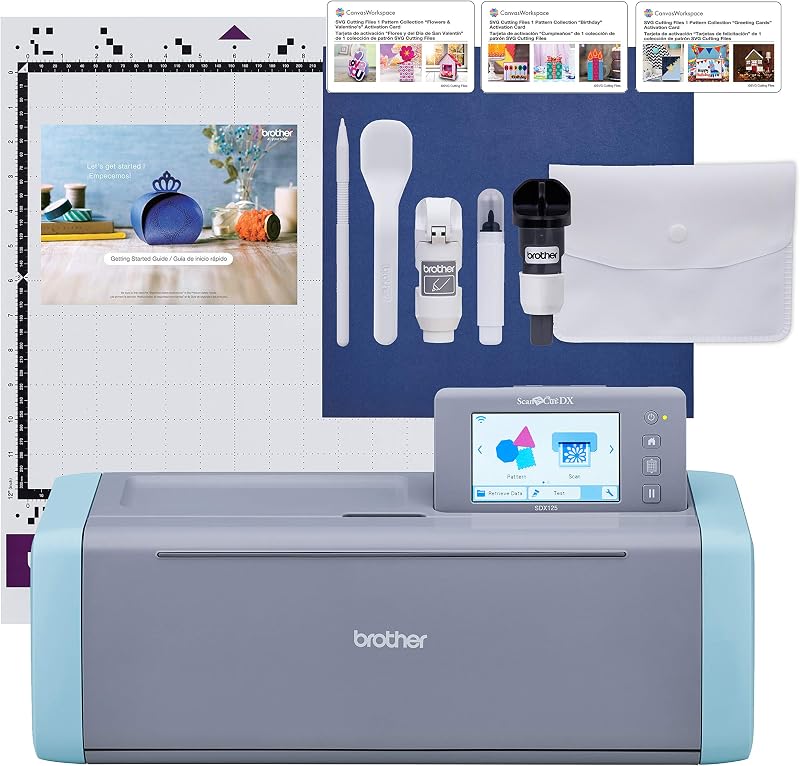
Brother SDX125E ScanNCut Electronic Cutting suits artists who want an integrated optical scanner built directly into the machine body to scan hand-drawn illustrations and cut around them without requiring a connected computer or external design software.
FAQ 170 words
What materials can the Cricut Explore 4 cut?
The Cricut Explore 4 cuts over 100 materials, including adhesive vinyl, iron-on heat transfer film, delicate paper, cardstock, craft felt, and lightweight leather.
Can the Cricut Explore 4 cut without a cutting mat?
Yes, the Cricut Explore 4 supports Smart Materials, which allow for continuous matless cutting up to 12 feet in length for long decals and banners.
Which tools are compatible with the Cricut Explore 4?
The machine is compatible with six tools designed for cutting, writing, drawing, scoring, and foiling. The fine-point blade and writing pen are included, while scoring and foiling tools are sold separately.
Does the Cricut Explore 4 bundle include a printed instruction manual?
No, the listing specifies that a printed physical manual is unavailable. The package provides an Explore 4 Digital Guide featuring eBooks, project tutorials, troubleshooting FAQ, and digital SVG files.
How does the cutting speed compare to earlier Cricut models?
The Cricut Explore 4 cuts up to two times faster compared to previous generations, significantly accelerating production times for high-volume apparel and decal projects.
The other listings this review names
-

-

Cricut Joy Xtra - Smart Cutting Machine | Digital Content Bundle
4.5/5 Amazon buyer average 5 spec fields
-

Brother SDX125E ScanNCut Electronic Cutting Machine Scanner
4.2/5 Amazon buyer average 6 spec fields