HP DeskJet 3755 All-in-One Printer Review: Space-Saving Performance
Robert Thackeray 22 Sep 2026 8 min read ASIN B01GAIU8ZC
This product against the Electronics median
| Figure | This product | Category median | Where it sits |
|---|---|---|---|
| Buyer score Average star rating left by Amazon buyers, out of 5. | 4.3 / 5 | 4.5 / 5 n=23 | 4% lower than the median |
| Spec fields published How many attributes the seller fills in on the listing. | 6 | 6.0 n=23 | level with the median |
Medians are taken across the 23 published reviews in Electronics; n on each row is how many of them publish that figure. The notch on every bar marks the median, so a fill reaching past the notch sits above it. Buyer score is the average star rating left by Amazon buyers, not a score from this site.

- Brand
- HP
- Buyer score
- 4.3 / 5 average from Amazon buyers
- Spec fields
- 6 attributes on the listing
As Amazon Associates, we earn from qualifying purchases. This means we may receive a small commission at no extra cost to you if you click through and make a purchase.
If you are curating a clean entertainment center or gaming battlestation where square footage is at an absolute premium, bringing a massive plastic office machine into the room is out of the question. The HP DeskJet 3755 addresses this exact dilemma by shrinking essential printing, scanning, and copying capabilities down to an ultra-compact chassis designed to tuck onto a corner shelf or the edge of a workspace. This particular listing covers a certified refurbished model tested and inspected to operate like new, providing full color inkjet functionality alongside modern network conveniences without demanding the physical footprint of a standard all-in-one machine.
Whether you need to generate quick tournament brackets, print physical cosplay patterns, output boarding passes, or handle everyday home paperwork, choosing the right compact peripheral requires understanding where compromises were made to achieve that smaller scale. In this breakdown, we examine the real-world utility of the HP DeskJet 3755, analyzing its unique scroll scan feed mechanism, wireless mobile configuration, compatibility with HP Instant Ink, and overall value for streamlined desks.
What You Get With the HP DeskJet 3755 122 words
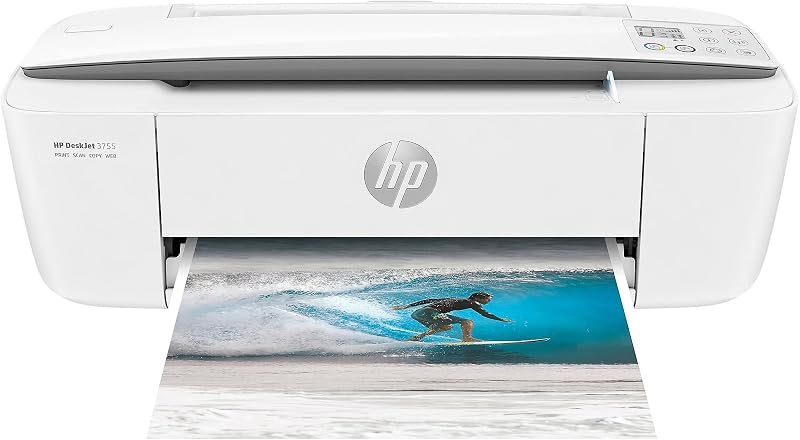
This certified refurbished release undergoes thorough functionality testing, basic cleaning, detailed inspection, and repackaging to ensure it operates and looks like a new unit straight out of the box. Although it may arrive in a plain generic box, it ships complete with all relevant accessories necessary for immediate installation.
- Certified refurbished HP DeskJet 3755 all-in-one inkjet unit with Stone Accent styling
- All relevant operational accessories packaged for setup
- Single-sheet Contact Image Sensor scroll scan intake system
- Integrated single input paper tray accommodating up to legal-size sheets
- Compact onboard LCD control display for quick status readouts
- Wireless and Cloud Print connectivity hardware with Alexa voice support
- Eligibility for HP Instant Ink automated cartridge replenishment services
- Limited warranty coverage provided by the refurbisher
Key Specifications 104 words
Feature Specification
- Printer Technology
- Inkjet
- Color Output
- Color and Black
- Product Dimensions
- 6.97 inches Deep by 15.86 inches Wide by 5.55 inches High
- Machine Weight
- 5.1 pounds
- Scanner Technology
- Single-page document feeder with Contact Image Sensor (CIS)
- Monochrome Copy Speed
- Up to 19 pages per minute
- Supported Media Types
- Plain paper, glossy photo paper, envelopes, banner paper, back print film
- Paper Trays
- 1 tray
- Control and Smart Assistants
- LCD panel, iOS, Amazon Alexa voice control
- Processor and Connectivity
- 1 processor, Cloud Print Enabled, Network-Ready wireless
Fields the seller filled in on the Amazon listing (6)
- Color
- Stone
- Size
- Stone
- Dimensions
- 2.74409448539 x 6.24409448182 x 2.18503936785 Inches
- Weight
- 5.13 pounds
- Product Group
- Office Product
- Binding
- Office Product
Space-Saving Design in Modern Desk Environments 208 words
Finding room for physical document hardware is a genuine headache when your primary workspace is already occupied by dual monitors, oversized mousepads, desktop audio gear, or gaming consoles. Measuring just 6.97 inches deep, 15.86 inches wide, and 5.55 inches high, the HP DeskJet 3755 compact size makes it one of the smallest all-in-one inkjet models available. At an ultralight 5.1 pounds, you can easily position it atop a floating wall shelf, a slender side table, or directly along the back edge of a desk without crowding out essential peripherals.
Integrating a printer into an active entertainment zone or gaming setup usually results in unsightly cable clutter and excessive bulk, but the slim proportions and Stone Accent trim on this chassis allow it to blend into contemporary furniture seamlessly. For creators and enthusiasts who occasionally evaluate heavier office equipment like the hp deskjet 2955 wireless all-in-one color printer scanner copier (a24hja), the 3755 presents a drastically reduced profile that preserves precious legroom and surface area.
The single input tray folds neatly against the rear chassis when not in use, keeping dust away from internal rollers while maintaining the printer’s ultra-shallow depth. This space-conscious architecture ensures you can keep printing utility within arm’s reach rather than relegating your printer to an entirely separate room or closet.
Document Digitization Through the Scroll Scan System 217 words
The primary engineering compromise that enables such a drastically reduced profile is the removal of the traditional glass flatbed scanner. Instead of lifting a heavy lid to lay pages down, the HP DeskJet 3755 scroll scan mechanism utilizes a specialized single-sheet intake powered by a Contact Image Sensor (CIS). You feed an individual sheet into the horizontal front slot, and the motorized roller pulls the medium across the optical sensor, digitizing receipts, tax documents, or gaming tournament scorecards directly to your connected device.
This intake channel is surprisingly flexible, capable of drawing in standard copy paper, thin receipts, glossy photo prints, and stiffer media like index cards or thick cardstock. Because the media travels directly through a straight horizontal path rather than bending around high-resistance interior drums, single-page scanning remains reliable for everyday household administrative tasks.
However, users must understand the physical constraints of this design before purchasing. Because there is no glass platen, you cannot scan bound book pages, open notebooks, passports, or delicate vintage paper that could tear under the tension of the feed rollers. If your daily creative or administrative workflow demands digitizing bound texts, a larger flatbed unit like the brother work smart 1410 wireless color inkjet all-in-one printer remains a necessary alternative, but for loose-leaf paperwork, the scroll scan format achieves enormous space savings.
Wireless Setup and Smart Device Connectivity 183 words
Modern home setups emphasize wireless flexibility, allowing you to trigger print tasks from anywhere on your home network without stringing unsightly USB cables across your flooring. The HP DeskJet 3755 setup process is built around quick synchronization with smartphones, tablets, laptops, and desktop computers. By leveraging mobile connectivity on iOS and compatible network protocols, users can initiate printing and monitor ink levels without having to interact with a complex desktop software utility.
In practice, HP DeskJet 3755 wireless printing handles casual tasks effortlessly. You can fire off tabletop character sheets, shipping labels, full-color glossy photo paper prints, and envelopes straight from a phone or laptop. The system is also Cloud Print enabled and network-ready out of the box, ensuring multiple household members or rooming partners can share access to the same hardware without bottlenecking through a single host computer.
Furthermore, smart home enthusiasts can take advantage of integrated controller options including Amazon Alexa. Enabling voice control through Alexa allows you to request printouts of standard templates, shopping lists, or calendar agendas using simple voice commands, fitting smoothly into a voice-automated entertainment room or smart study.
Ink Economics and Media Handling Versatility 215 words
Compact inkjet hardware is notoriously vulnerable to running dry if ink usage is not monitored carefully, especially when switching between mono text and color graphics. The HP DeskJet 3755 Instant Ink eligibility allows users to enroll in automated cartridge delivery based on page consumption rather than manual cartridge replacement. Because Instant Ink calculates usage purely by sheets printed rather than the volume of color laid down, full-bleed color artwork and monochrome text documents carry identical coverage terms.
For individuals who prefer to avoid monthly subscription plans, the machine supports standard black and tri-color cartridges as well as optional HP high-yield cartridges. The onboard LCD panel provides immediate visibility over operational status and mechanical prompts, helping you track current tasks without opening an external software suite. When high-volume printing is a non-negotiable requirement, heavy-duty continuous tank hardware like the epson ecotank et-2903 wireless all-in-one color supertank printer makes more operational sense, but for intermittent personal output, the 3755 delivers solid media versatility.
In addition to basic copy paper, the feed mechanism handles back print film, banner paper, envelopes, and glossy photo paper. With black-and-white copy speeds reaching up to 19 pages per minute and a maximum copy limit rated up to 9,000 copies per run, this miniature chassis can easily handle sporadic household projects, school assignments, and craft print runs.
HP DeskJet 3755 Pros and Cons 59 words
Pros
Pros
- Ultra-compact footprint fits tight desk spaces
- Lightweight 5.1-pound chassis is easy to relocate
- Flexible scroll scan accepts cardstock and photo paper
- Supports Amazon Alexa voice commands and iOS printing
- Eligible for HP Instant Ink cartridge delivery
Cons
- No flatbed scanner for books or passports
- Single-sheet manual scanner feed requires hands-on feeding
- Lacks an automatic two-sided duplex document feeder
Is the HP DeskJet 3755 Worth It 184 words
Evaluating whether the HP DeskJet 3755 is worth it comes down to a balance between physical space constraints and your expected print volume. If your living space, gaming station, or dorm room cannot spare more than seven inches of desk depth, this model provides the essential tri-functionality of printing, scanning, and copying in a chassis that outperforms almost everything else in its size category. It is an ideal pick for casual users who only need to print occasional event passes, shipping labels, homework sheets, or glossy photo snapshots without sacrificing valuable desktop real estate.
Conversely, if your routine involves digitizing thick textbooks, archiving delicate memorabilia, or churning through hundreds of pages each week, the compromises inherent in an ultra-compact chassis will become clear. The absence of an automatic two-sided duplexer and the single-sheet limitation of the scroll scan feeder mean that intensive office duties will feel tedious on this machine.
As a certified refurbished peripheral, it offers tested reliability and certified component quality, making it a sensible investment for minimalists, students, and entertainment enthusiasts who prioritize a clean, uncluttered work area above heavy-duty enterprise features.
Other Options to Consider 87 words
Print suits users who want the advantages of a compact desktop footprint combined with an integrated refillable tank system that eliminates traditional cartridge replacements for high-frequency home and office printing.
Canon PIXMA TR4720 All-in-One Wireless caters to shoppers who need full multi-page administrative utility, offering an automatic document feeder and built-in fax capabilities for dedicated home office paperwork.

Best-for-home is built for productivity-focused households that require automatic duplex two-sided printing, an auto document feeder, a 1.8-inch display, and broad smart assistant integration.
FAQ 248 words
Does the HP DeskJet 3755 have a traditional flatbed glass scanner
No, the HP DeskJet 3755 does not include a glass flatbed scanner. Instead, it utilizes an innovative single-page document feeder with a Contact Image Sensor scroll scan system, which pulls individual sheets through a front intake slot to keep the machine exceptionally slim.
Can you scan thick books or passports with this printer
Because scanning relies entirely on the motorized scroll scan intake roller, you cannot scan bound book pages, thick passports, or stiff three-dimensional items. Scanning is limited to individual loose-leaf sheets of plain paper, receipts, photo paper, and relatively flexible cardstock.
What devices are compatible with the HP DeskJet 3755
The printer connects wirelessly to laptops, desktop PCs, smartphones, and tablets. It supports mobile operating environments like iOS and features Cloud Print capabilities, along with smart home integration via Amazon Alexa for voice-activated printing.
What comes included with this certified refurbished unit
According to the product specifications, this certified refurbished unit undergoes functionality testing, cleaning, inspection, and repackaging to perform like new. It ships with all relevant accessories necessary for operation, backed by a limited warranty, though it may arrive packaged in a generic box.
Does the HP DeskJet 3755 require an HP Instant Ink subscription to print
No, an HP Instant Ink subscription is entirely optional. While the hardware is HP Instant Ink eligible to provide automated replacement cartridge deliveries, you can also operate the printer using standard replacement cartridges or optional HP high-yield cartridges purchased independently.
The other listings this review names
-

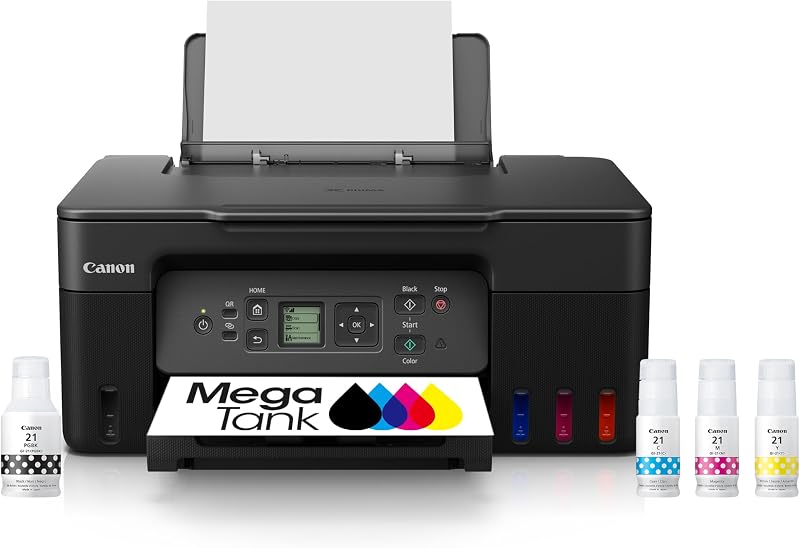
Canon MegaTank G3270 All-in-One Wireless Color Printer
4.7/5 Amazon buyer average 6 spec fields
-

3.9/5 Amazon buyer average 60 spec fields
-

Brother Work Smart 1360 Wireless Color Inkjet All-in-One Print, Scan, Copy
4.6/5 Amazon buyer average 6 spec fields





