Logitech MX Keys S Breakdown: Low-Profile Control for Work and Play
Robert Thackeray 6 Nov 2026 9 min read ASIN B0BKVY4WKT
This product against the Electronics median
| Figure | This product | Category median | Where it sits |
|---|---|---|---|
| Our score Our score, out of 10. | 8.6/10 | 8.8/10 n=65 | 2% lower than the median |
| Spec fields published How many attributes the seller fills in on the listing. | 5 | 6.0 n=65 | 17% fewer than the median |
Medians are taken across the 65 published reviews in Electronics; n on each row is how many of them publish that figure. The notch on every bar marks the median, so a fill reaching past the notch sits above it. Scores are out of 10, based on listed specifications and buyer feedback.

- Brand
- Logitech
- Our score
- 8.6/10
- Spec fields
- 5 attributes on the listing
As Amazon Associates, we earn from qualifying purchases. This means we may receive a small commission at no extra cost to you if you click through and make a purchase.
If you spend your computing days cycling between data entry, creative applications, and evening gaming, finding an input device that provides responsive feedback without generating intrusive typing noise can be challenging. The Logitech MX Keys S enters the desktop space as a refined low-profile membrane peripheral designed specifically for users who require typing speed, multi-system management, and clean ergonomics. Built around a slim laptop-style form factor with spherically-dished keycaps shaped to cradle your fingertips, this unit emphasizes tactile precision and quieter keystrokes over the aggressive bulk of traditional desktop keyboards. Whether your workstation is dedicated to intense professional productivity or general media enjoyment, this model aims to offer a unified, comfortable interface.
Evaluating a flagship desktop peripheral involves understanding how its structural design, switch mechanics, and companion software integrate into your daily workflow. In this detailed breakdown, we examine the core architecture of the hardware, looking closely at how its scissor-stabilized membrane switches perform across productivity tasks and casual gaming scenarios. We also evaluate the smart illumination features that react to hand proximity, the automation capabilities unlocked by Logi Options+ Smart Actions, and the endurance provided by its internal rechargeable battery. By exploring these capabilities alongside alternative desktop options, this review provides the essential context required to decide whether this keyboard fits your computing lifestyle.
What You Get With the Logitech MX Keys S 200 words

The hardware package provides a comprehensive, full-sized workstation configuration tailored for modern multi-device computing. Based on the performance combo specifications, the unit delivers both the dedicated low-profile keyboard and an advanced companion mouse, alongside essential wireless connectivity hardware and integrated rechargeable power cells.
- Logitech MX Keys S full-size wireless keyboard with a 104-key standard QWERTY layout and dedicated numeric keypad.
- Integrated rechargeable lithium-polymer battery delivering 1500 mAh of internal power for cordless desk operation.
- Spherically-dished keycaps designed to guide fingertip placement and deliver a fast, fluid, and quieter typing feel.
- Smart illumination system with proximity sensors that illuminate key backlighting as hands approach and adapt automatically to room lighting.
- Dual wireless pairing capabilities supporting Bluetooth Low Energy protocols and the included Logi Bolt USB receiver.
- Easy-Switch memory profiles capable of pairing and alternating between three separate host devices on the fly.
- Accompanying MX Master 3S wireless mouse equipped with an 8K DPI Darkfield optical sensor and a MagSpeed electromagnetic scroll wheel capable of scrolling 1000 lines per second.
- Full compatibility with the Logi Options+ software utility for programming multi-step Smart Actions shortcuts and lighting profiles.
- Sustainable chassis fabrication incorporating 26 percent post-consumer recycled plastic in the graphite keyboard assembly.
Key Specifications 167 words
A detailed examination of hardware specifications reveals how a peripheral will occupy desk real estate, connect to host machines, and hold up under continuous daily usage. The data below outlines the primary factory specifications for the keyboard configuration.
Specification Category Listing Detail
- Keyboard Switch Mechanism
- Low-profile membrane architecture
- Total Key Count and Layout
- 104 keys, full-size QWERTY layout with numeric keypad
- Physical Dimensions
- 20.5 mm in height, 430.2 mm in width, 131.63 mm in depth
- Product Weight
- 810 grams for stable desktop placement
- Battery Capacity and Chemistry
- Rechargeable Lithium-Polymer (1500 mAh capacity)
- Wireless Technologies
- Bluetooth Low Energy and Logi Bolt USB wireless receiver
- Multi-Host Device Pairing
- Supports up to 3 individual host devices simultaneously
- Backlighting Technology
- Smart illumination with hand proximity detection and ambient light sensors
- Supported Operating Systems
- Windows 11, macOS 13 Ventura, Ubuntu 22.04 Jammy Jellyfish, ChromeOS 134, Android 13.0, iPadOS 17
- Eco-Friendly Materials
- Graphite finish utilizing 26 percent certified post-consumer recycled plastic
Fields the seller filled in on the Amazon listing (5)
- Color
- Graphite
- Size
- Keyboard + Mouse Combo
- Dimensions
- 17.91 x 5.75 x 3.15 Inches
- Product Group
- Personal Computer
- Binding
- Personal Computers
Low-Profile Typing Feel and Gaming Responsiveness 282 words
Assessing the logitech mx keys s typing experience begins with understanding its low-profile scissor membrane switches. Unlike deep mechanical keys that demand substantial finger travel and create pronounced auditory clicks, this board presents a laptop-like travel distance that minimizes finger fatigue during extended writing sessions. The spherically-dished keycaps guide fingertips toward the exact center of each key, significantly reducing unintended keystrokes while maintaining fluid cadence. For professionals who draft documentation, manage code, or handle continuous customer communication, the acoustic damping ensures that keypresses remain discreet even when paired with desktop voice equipment like the logitech zone wired 2.
When evaluating the logitech mx keys s for gaming, user expectations must be grounded in the inherent characteristics of low-profile membrane construction. For strategy games, city builders, role-playing adventures, and casual entertainment, the quick bottom-out distance and stable keycaps offer responsive, dependable control. You can issue squad commands, cycle through inventory bars, and execute map shortcuts without experiencing key wobble or missed inputs. Because the board rests at an optimum ergonomic angle on an 810-gram frame, it remains anchored to the desktop during intense gaming sessions without sliding across your desk surface.
However, when looking at the logitech mx keys s vs mechanical keyboards for competitive esports, distinct trade-offs emerge. Enthusiast mechanical boards often feature specialized linear switches, ultra-high polling rates, adjustable actuation points, and full N-key rollover designed specifically for millisecond twitch reactions in fast-paced first-person shooters. The membrane structure of this peripheral prioritizes quiet tactile feedback and typing endurance over aggressive competitive gaming metrics. Casual players will appreciate the smooth travel and silent action, but competitive gamers who demand hyper-fast switch resets will find standard mechanical switches more aligned with their reflex requirements.
Smart Illumination and Software Customization 266 words
A standout physical attribute of the hardware is the logitech mx keys s smart illumination system, which integrates ambient light sensors and proximity detection directly into the top deck. Rather than keeping backlights continuously activated and draining the battery, the keyboard senses the presence of your hands as they hover above the surface and illuminates the legends instantaneously. As your lighting conditions shift from midday sunlight to late-night gaming ambiance, the illumination automatically modulates its brightness level to match the environment, or it can be fine-tuned manually through companion software.
Power users can elevate their daily productivity through logitech mx keys s smart actions, an automation framework managed inside the downloadable Logi Options+ desktop application. This utility enables users to record and deploy multi-layered macros triggered by a single keystroke, stringing together complex chains of commands such as opening specific browser tabs, adjusting media levels, launching communication channels, and pasting standard text snippets. Just as individuals streamline their living spaces by pairing connected hardware like the aqara smart lock u100 to eliminate repetitive manual steps, configuring custom macros on your keyboard reduces operational friction across professional and entertainment workflows.
The Logi Options+ software also provides fine-grained control over function key behavior and application-specific configurations. You can assign individual shortcut behaviors to the function row depending on whether you are actively navigating an audio editing workstation, browsing streaming media, or playing an interactive adventure. This software layer transforms the physical 104-key deck into an adaptable command center, giving multimedia fans fast access to volume toggles, screen brightness adjustments, and system navigation commands without interrupting the ongoing task.
Multi-Device Connectivity and Battery Reliability 259 words
Managing multiple computer setups is seamless thanks to robust logitech mx keys s bluetooth connectivity and the included Logi Bolt USB receiver. The keyboard features three dedicated Easy-Switch keys that store individual pairing profiles, allowing you to alternate between a primary Windows desktop, an Apple MacBook, or an iPad tablet with a single tap. The hardware supports Bluetooth Low Energy protocols alongside modern operating systems including Windows 11, macOS 13 Ventura, Ubuntu 22.04 Jammy Jellyfish, and Android 13.0. Note that Mac users with FileVault disk encryption enabled should connect via the Logi Bolt USB receiver, as FileVault can prevent Bluetooth keyboards from entering account passwords during initial system boot or restart sequences.
Operating longevity is anchored by a built-in 1500 mAh rechargeable lithium-polymer battery, delivering stable power without the need for disposable alkaline cells. The logitech mx keys s battery life is directly influenced by how you configure the smart backlighting; keeping the illumination on automatic sensing ensures optimal runtimes, while disabling backlighting entirely extends endurance for multiple months of standard desktop operation. The keyboard charges via an integrated USB-C port, allowing users to continue typing without disruption while the battery replenishes its internal capacity.
In mixed workstation environments, pairing stability is further reinforced by the Logi Bolt wireless protocol. The USB receiver delivers a secure, low-latency wireless connection that resists signal interference in crowded office spaces or entertainment setups dense with wireless equipment. For entertainment setups that combine automated desk accessories with smart home gear like an aqara u200 lite, maintaining reliable, interference-free wireless performance across your peripheral lineup ensures smooth, continuous productivity.
Logitech MX Keys S Pros and Cons 51 words
Pros
Pros
- Quiet low-profile scissor membrane typing
- Proximity-sensing smart illumination backlighting
- Multi-device pairing for up to three systems
- Logi Options+ Smart Actions macro automation
- Rechargeable 1500 mAh lithium-polymer battery
Cons
- Lacks high-polling mechanical switches for competitive esports
- Requires Logi Bolt for Mac FileVault boot login
- Full-size footprint takes significant desk space
Is the Logitech MX Keys S Worth It 231 words
Determining whether this peripheral is the right desktop investment comes down to how you balance professional typing obligations against leisure and entertainment. If you are a remote professional, digital content creator, software developer, or student who values low-profile ergonomics, whisper-quiet keystrokes, and fluid multi-device switching, this hardware excels. The precision dish shaping on each keycap, combined with intelligent proximity lighting and robust Logi Options+ automation, creates an effortless daily workflow that traditional clacky keyboards cannot match.
For casual gamers who spend their evenings immersed in role-playing adventures, simulation builders, strategy games, or media streaming, the unit offers more than enough tactile speed and physical stability to deliver a satisfying experience. Its heavy 810-gram footprint prevents sliding during heated moments, while the quiet membrane design keeps room noise minimal during late-night gaming sessions or shared home office environments. The seamless transition between work laptops and home entertainment rigs makes it a versatile central hub for hybrid spaces.
Conversely, dedicated esports enthusiasts who focus primarily on high-speed competitive shooters, rhythm titles, or fighting games will likely want to look elsewhere. The lack of deep physical key travel, hyper-fast mechanical switch reset points, and customizable per-key mechanical actuation means this model is not designed for competitive twitch gaming. If pure gaming performance and rapid-fire key spamming are your primary desktop criteria, a dedicated gaming mechanical keyboard remains the superior tool for those specific demands.
Other Options to Consider 96 words
Amazon Basics Wired QWERTY Keyboard offers a straightforward, plug-and-play wired solution for Windows users who prefer zero-maintenance simplicity without dealing with Bluetooth pairing or recharging batteries.
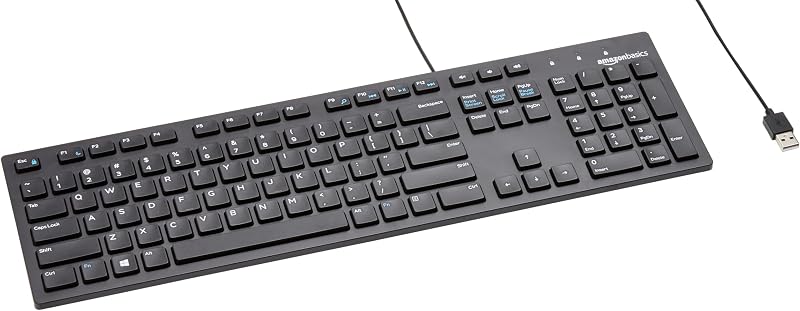
Full size keyboard with spill-resistant suits cost-conscious workstations and high-traffic desks needing durable spill protection, bundled ambidextrous mouse tracking, and basic wireless operation through a single USB-A nano receiver.
Creamy Computer Keyboard for PC caters directly to mechanical aesthetics and dedicated desktop gaming enthusiasts, offering a compact 68-key footprint, vibrant RGB backlighting, a 2000mAh battery, and silent carbon fiber keycaps.

FAQ 268 words
Does the Logitech MX Keys S feature mechanical switches?
No, the keyboard is constructed with a low-profile membrane switch mechanism supported by scissor stabilizers. This architecture provides a fast, fluid, laptop-like typing feel that is significantly quieter than traditional mechanical keyboards while offering dished keycaps for fingertip precision.
How does the smart illumination system work?
The keyboard incorporates hand proximity sensors and ambient light detectors that illuminate the key backlighting as your hands approach the deck. The system automatically adjusts lighting intensity based on the ambient brightness of the room, helping preserve battery life while ensuring clear legend visibility.
Can you use the Logitech MX Keys S for gaming?
Yes, the keyboard handles casual gaming, strategy games, simulation titles, and everyday media control very effectively due to its stable scissor keys and weighty 810-gram frame. However, competitive esports players who require high polling rates, deep key travel, and adjustable mechanical actuation may prefer a dedicated mechanical gaming board.
How many devices can the Logitech MX Keys S connect to simultaneously?
The keyboard can be paired with up to three distinct devices via Bluetooth Low Energy or the Logi Bolt USB receiver. Dedicated Easy-Switch keys allow you to transition instantly between operating systems including Windows 11, macOS, Ubuntu Linux, ChromeOS, Android, and iPadOS.
Why is the Logi Bolt receiver recommended for Mac users with FileVault?
When FileVault full-disk encryption is active on a macOS computer, the system prevents Bluetooth connections from initializing prior to user login. In this scenario, using the included Logi Bolt USB receiver ensures the keyboard functions immediately upon boot so you can enter your system password.
The other listings this review names
-

9.6/10 Our score 6 spec fields
-

Logitech MK270 Full Size Wireless Keyboard and Mouse Combo - Black
8.0/10 Our score 6 spec fields
-

MechLands Halo68 Silent Wireless Gaming Keyboard w/Light Box, 68 Keys
8.6/10 Our score 2 spec fields