Brother ScanNCut SDX125E Review: Standalone Scanner Performance
Julia Ellery 22 Sep 2026 10 min read ASIN B07QRB25T4
This product against the Tools & Outdoors median
| Figure | This product | Category median | Where it sits |
|---|---|---|---|
| Buyer score Average star rating left by Amazon buyers, out of 5. | 4.2 / 5 | 4.4 / 5 n=48 | 5% lower than the median |
| Spec fields published How many attributes the seller fills in on the listing. | 6 | 5.0 n=48 | 20% more than the median |
Medians are taken across the 48 published reviews in Tools & Outdoors; n on each row is how many of them publish that figure. The notch on every bar marks the median, so a fill reaching past the notch sits above it. Buyer score is the average star rating left by Amazon buyers, not a score from this site.

- Brand
- Brother
- Buyer score
- 4.2 / 5 average from Amazon buyers
- Spec fields
- 6 attributes on the listing
As Amazon Associates, we earn from qualifying purchases. This means we may receive a small commission at no extra cost to you if you click through and make a purchase.
Choosing the right hardware for custom crafting, tabletop game modifications, and custom sticker production often comes down to how much autonomy you want from your computer desk. The Brother ScanNCut SDX125E stands apart from conventional electronic craft cutters by integrating an optical scanner and an onboard display directly into the chassis. Instead of forcing you to prepare cut lines inside external design software, this dedicated scan and cut machine captures real-world drawings, printed artwork, or physical templates and converts them into ready-to-cut digital vectors right on the spot. For creators looking to design custom decals, personalized gaming tokens, or detailed multi-layer paper assemblies without being chained to a laptop, it delivers a uniquely self-contained production workflow.
Selecting this specific brother sdx125e scanncut model means investing in automated blade calibration, deep media clearance, and a hardware-first design philosophy. In this comprehensive brother sdx125e review, we evaluate the machine’s genuine mechanical capabilities, its standalone 5-inch interface, the precision of its optical digitizer, and how it holds up for crafters focused on efficiency. We also examine its practical limitations, explore who benefits most from its automated features, and outline relevant market alternatives to help you decide if it fits your creative space.
What You Get With the Brother ScanNCut SDX125E 125 words
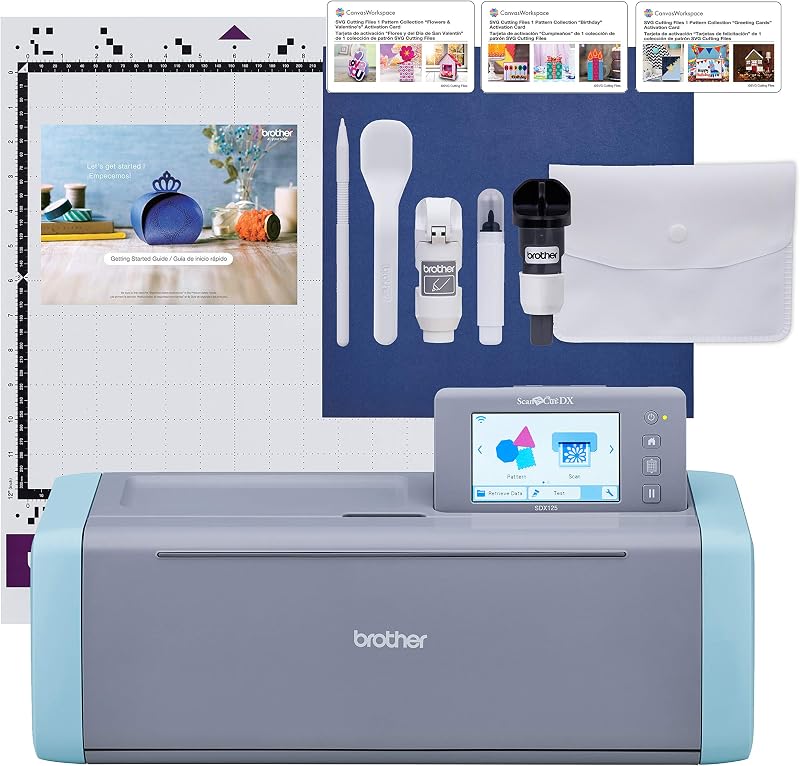
The brother sdx125e scanncut package includes an extensive collection of baseline accessories, tools, and digital files intended to support creative work straight out of the box without requiring supplemental hardware purchases.
- Brother ScanNCut SDX125E electronic cutting machine with integrated scanner
- 12-inch by 12-inch standard tack adhesive cutting mat
- ScanNCut DX auto blade and matching auto blade holder
- Precision touch pen stylus for navigating the touchscreen
- Ergonomic craft spatula for lifting delicate cutouts from the mat
- Accessory storage pouch for organizing blades and tools
- Black craft pen and dedicated pen holder for automated sketch work
- Pattern collection booklet featuring 76 additional patterns
- 682 built-in designs, including 100 quilting patterns and 9 distinct lettering fonts
- Getting Started instructional guide and one piece of sample cardstock
Key Specifications 109 words
Feature Specification
- Brand and Manufacturer
- Brother / Brother International Corp
- Model Number
- SDX125E
- Scanner Optical Resolution
- Up to 600 DPI
- Maximum Cutting Thickness
- 3 millimeters (0.1 inches)
- Active Work Surface
- 144 square inches (12 inches by 12 inches)
- Display Interface
- 5-inch LCD color touchscreen
- Operation Mode
- Automatic material sensing
- Built-In Assets
- 682 designs, 100 quilting patterns, 9 fonts
- Connectivity Options
- Wireless LAN and built-in USB port
- Physical Dimensions
- 8.4 inches deep by 20.9 inches wide by 6.8 inches high
- Electrical Rating
- 120 volts AC (intended for US sale only)
- Warranty Coverage
- 1-year limited warranty
Fields the seller filled in on the Amazon listing (6)
- Color
- Titanium/Aqua
- Size
- Machine
- Dimensions
- 8.4 x 20.9 x 6.8 Inches
- Weight
- 1 Pounds
- Product Group
- Home
- Binding
- Tools & Home Improvement
Scanning Physical Artwork and Sticker Precision 293 words
The defining capability of this unit is the brother scanncut built in scanner, which operates at resolutions up to 600 DPI. In standard craft plotters, producing custom die-cut or kiss-cut stickers requires printing specialized visual registration marks through proprietary software, which an optical sensor then searches for across the page. The SDX125E replaces this clumsy registration routine with a complete digital scan of your physical sheet. It scans the loaded media, displays the high-resolution capture directly on the color display, and lets you generate outline cut paths around your printed artwork automatically. For illustrators, sticker creators, and gaming fans creating custom character tokens, this direct-to-cut functionality dramatically reduces alignment errors.
Using the brother scanncut for stickers also streamlines scrap utilization. Because the machine captures an actual image of whatever you load onto the 12-inch by 12-inch mat, you can see exactly where leftover scraps of vinyl, foil, or holographic stock are located. You can manually drag your design elements across the touchscreen to fit perfectly inside oddly shaped offcuts, eliminating the guesswork of counting mat grid lines. When creators compare standalone scanning to traditional optical mark detection on units like the cricut maker 4 machine, the fundamental advantage of Brother’s hardware lies in this immediate, visual placement without consulting a computer monitor.
Beyond commercial print media, the scanner excels at converting hand-drawn artwork directly into vector paths. You can sketch a concept on plain paper, feed it into the scanning bed, and instruct the machine to convert the outer contours into cut lines or inner details into pen-drawn accents. This makes the SDX125E exceptionally appealing for cosplay prop fabrication, miniature terrain drafting, and home organization projects where physical templates are easier to trace by hand than construct from scratch in vector design suites.
Auto Blade Calibration and Thick Material Handling 259 words
Calibrating blade depth is traditionally one of the most frustrating aspects of digital die cutting, often leading to wasted materials or torn mat surfaces. The scan and cut auto blade included with the SDX125E removes this friction through integrated material sensor technology. When a job begins, the automated holder presses down to detect the physical thickness and resistance of the loaded media before engaging the drive system. This automated sensing adjusts blade extension and cutting pressure on the fly, eliminating the need to manually choose specific material profiles from a rigid pre-configured drop-down menu.
This automated clearance directly supports the scanncut 3mm cutting performance. While many standard craft plotters cap their mechanical clearance below 2 millimeters, the SDX125E can slice through materials up to 3 millimeters (0.1 inches) in depth. This enables hobbyists to process dense materials including balsa wood, craft foam, heavy chipboard, felt, real leather, and corrugated cardboard. For tabletop gamers and maker enthusiasts, cutting 3mm foam sheets and chipboard opens up custom miniature organizers, modular scenery tiles, and sturdy structural inserts that thinner cutters cannot manage.
Crafters transitioning from smaller desktop vinyl tools such as the cricut joy xtra will notice a substantial increase in raw cutting versatility. Even with the advanced sensor array, Brother explicitly advises performing a quick trial cut prior to running complex jobs. Material densities can vary widely across different brands of craft foam or wood veneers, and a rapid test cut verifies that the automatic depth measurement cleanly slices through your face material without piercing through the backing carrier or adhesive liner.
Operational Parameters and Workshop Integration 234 words
While the Brother SDX125E offers unmatched autonomy, integrating it into your workshop requires understanding its physical footprint and structural requirements. Measuring 20.9 inches wide, 8.4 inches deep, and 6.8 inches high, this is a substantial piece of tabletop machinery. Because the 12-inch by 12-inch standard tack mat feeds through both the front and rear of the chassis during scanning and cutting passes, you must maintain at least a foot of clear, unobstructed clearance behind the machine to prevent binding and misaligned cuts.
Electrical specifications are another vital operational factor. The listing states that this product is intended strictly for sale and operation within the United States at 120 volts AC, and any alternative voltage application voids the manufacturer warranty. Creators seeking alternative production methods for non-pliable items might explore specialized optical equipment like the x tool m2 color craft laser cutter and engraver, but for standard flexible stock, cardstock, vinyl, and lightweight woods, the SDX125E delivers reliable mechanical fabrication without ventilation requirements.
Maintenance focuses primarily on keeping the scanning glass clean and maintaining proper mat tackiness. Because the optical scanner reads your media from below as it feeds through the chassis, stray adhesive residue, vinyl backing dust, or paper fibers can obscure the lens and cause visual artifacts during auto-trace routines. Regularly wiping the scanning area and using the included spatula to lift delicate cutouts prevents build-up and preserves clean cut tolerances over long production runs.
Brother ScanNCut SDX125E Pros and Cons 68 words
Pros
Pros
- Built-in 600 DPI scanner converts physical art to cut paths
- Automatic blade sensor detects material depth without manual dials
- Cuts dense craft materials up to 3mm thickness
- Standalone operation via 5-inch color LCD touchscreen
- Includes 682 built-in designs, 100 quilting patterns, 9 fonts
Cons
- Requires 120V US power supply to maintain warranty
- Substantial desk footprint requiring front and rear feed clearance
- Trial cuts recommended to ensure clean material separation
Is the Brother ScanNCut SDX125E Worth It 218 words
Determining whether the SDX125E justifies a spot in your creative setup depends primarily on your preferred design workflow. If you prioritize standalone operation, hate being tethered to mandatory cloud software, and regularly cut printed graphics or hand-drawn sketches, the answer to is brother scanncut worth it is a decisive yes. The integration of a true 600 DPI scanner completely changes how you approach stickers, fabric applique, and mixed-media paper crafts by removing the frustrating alignment friction found on standard plotters.
The robust brother scanncut specs make it an exceptional tool for tabletop gamers building foam terrain, cosplayers cutting multi-layer structural accents, and independent creators running localized sticker batches. The combination of automatic blade sensing and generous 3mm vertical clearance allows you to bounce between delicate adhesive vinyl and dense balsa wood without spending twenty minutes manually fine-tuning blade depths and running repeated calibration sheets.
Conversely, if your creative projects consist solely of cutting simple heat transfer vinyl rolls directly from pre-purchased SVG files and you already keep a computer permanently stationed beside your workspace, the premium hardware of an integrated scanner and color LCD screen may exceed your daily requirements. But for artists seeking the best scan and cut machine for true desktop independence, the SDX125E represents one of the most capable, versatile, and user-friendly platforms available.
Other Options to Consider 181 words
VEVOR Vinyl Cutting Machine suits makers who prioritize wide format cutting driven by desktop or mobile software. Featuring a 12-inch cutting width, manual button controls, and compatibility across Mac, Windows, Android, and iOS alongside 20,000+ digital resources, it appeals to crafters who prefer managing large-scale vinyl signage through external devices rather than relying on an integrated scanner.

Includes 30 images in Design provides the Cricut Joy Xtra smart cutting machine paired with a digital content bundle inside the Design Space App. This package is ideal for creators who work exclusively within a mobile app ecosystem and need a compact desktop cutter for standard decals, cards, and labels without the larger footprint of a standalone scanning unit.
Smart Cutting Machine with Smart delivers the Cricut Joy 2 Essential Bundle complete with a rainbow sampler of smart materials, cardstock, and iron-on vinyl capable of completing up to 65 projects. It is tailored for beginning crafters who want a comprehensive starter kit of project consumables out of the box rather than advanced standalone material sensing and physical scanning hardware.

FAQ 297 words
Can the Brother ScanNCut SDX125E cut stickers without a computer?
Yes. You can place your printed sticker sheet directly onto the standard tack mat, feed it into the machine, and use the built-in 600 DPI scanner to capture the page. The 5-inch LCD touchscreen allows you to generate cut lines directly around your artwork, apply offsets, and execute the cuts without connecting a computer or mobile device.
What materials can the scan and cut auto blade handle?
The auto blade uses material sensor technology to detect thickness automatically. It can cut a broad range of crafting media up to 3 millimeters (0.1 inches) thick, including paper, adhesive vinyl, heat transfer vinyl, fabric, felt, craft foam, chipboard, balsa wood, and leather.
Does the Brother ScanNCut SDX125E require an internet connection to operate?
No. An internet connection is entirely optional. The SDX125E functions as a fully standalone machine with 682 built-in designs and onboard vector editing tools. You can also import external designs directly using a standard USB thumb drive. Wireless capability is included if you prefer transferring files over a local network, but it is not required for daily use.
How does the built-in scanner assist with project alignment?
The scanner takes a real-time digital image of the entire 12-inch by 12-inch mat surface and displays it on the touchscreen. This allows you to visually drag and position cut shapes onto specific areas of leftover material or align cuts perfectly around pre-printed illustrations without manually measuring or counting mat grid blocks.
What is the maximum cutting depth supported by the machine?
The SDX125E supports media up to 3 millimeters (0.1 inches) in thickness. This expanded clearance allows the unit to process denser and more rigid project materials like balsa wood, leather, and craft foam that standard electronic cutters cannot accommodate.
The other listings this review names
-

-

Cricut Joy Xtra - Smart Cutting Machine | Digital Content Bundle
4.5/5 Amazon buyer average 5 spec fields
-

Cricut Joy 2 Essential Bundle + Rainbow Sampler
4.2/5 Amazon buyer average 5 spec fields