TP-Link Archer BE600 (BE9700) Review: High-Bandwidth Wi-Fi 7 Power
Robert Thackeray 11 Nov 2026 11 min read ASIN B0F76PQ2T8
This product against the Electronics median
| Figure | This product | Category median | Where it sits |
|---|---|---|---|
| Our score Our score, out of 10. | 9.0/10 | 8.8/10 n=81 | 2% higher than the median |
| Spec fields published How many attributes the seller fills in on the listing. | 5 | 6.0 n=82 | 17% fewer than the median |
Medians are taken across the 82 published reviews in Electronics; n on each row is how many of them publish that figure. The notch on every bar marks the median, so a fill reaching past the notch sits above it. Scores are out of 10, based on listed specifications and buyer feedback.

- Brand
- TP-Link
- Our score
- 9.0/10
- Spec fields
- 5 attributes on the listing
As Amazon Associates, we earn from qualifying purchases. This means we may receive a small commission at no extra cost to you if you click through and make a purchase.
Enthusiasts upgrading their home network infrastructure often face a common bottleneck: internet service providers deliver multi-gigabit speeds, but standard consumer hardware cannot distribute that bandwidth effectively to high-end PCs, consoles, and mobile clients. The TP-Link Archer BE600 directly addresses this issue, operating under the BE9700 classification to offer high-throughput Wi-Fi 7 wireless connectivity paired with serious multi-gigabit physical switching capacity. For PC gamers competing online, console players downloading massive modern patches, and households running high-resolution 4K or 8K video streams, this tri-band router serves as a dedicated command center designed to eliminate both wired and wireless congestion.
Whether you are considering this specific hardware for its 10 Gbps Ethernet capabilities, low-jitter wireless performance, or expansive multi-device capacity, understanding how its architecture translates to everyday performance is critical. In this comprehensive review, we examine the core features of the TP-Link Archer BE600, including its tri-band speeds, physical port configuration, wireless coverage footprint, management software, and security protocols. We also analyze where this unit fits relative to other market alternatives so you can determine if it aligns with your specific gaming and entertainment requirements.
What You Get With the TP-Link Archer BE600 199 words
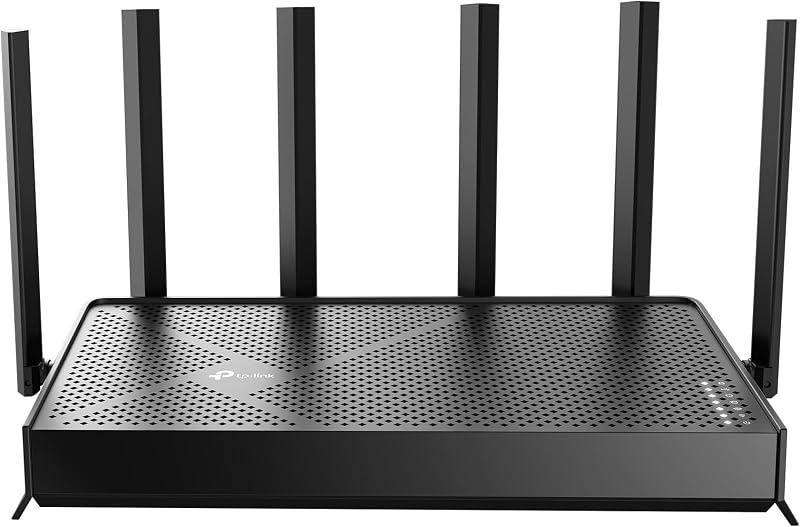
The Archer BE600 arrives as a unified standalone Wi-Fi 7 networking hub engineered to support up to 120 client devices across modern smart homes and gaming environments. The manufacturer specifies several core hardware components and built-in technologies designed to optimize high-bandwidth traffic:
- BE9700 tri-band wireless connectivity delivering rated speeds of up to 5,765 Mbps on the 6 GHz band, 2,882 Mbps on the 5 GHz band, and 1,032 Mbps on the 2.4 GHz band.
- Next-generation Wi-Fi 7 architecture incorporating 320 MHz ultrawide channels, Multi-Link Operation (MLO), Multi-RUs, and 4K-QAM modulation.
- Extensive multi-gigabit wired connectivity featuring one 10 Gbps WAN/LAN port, one 2.5 Gbps WAN/LAN port, and three dedicated 2.5 Gbps LAN ports.
- One integrated USB 3.0 port designed for local storage sharing and media server deployment.
- Six internal, optimally positioned antennas paired with hardware beamforming to provide wireless coverage reaching up to 2,600 square feet.
- A quad-core CPU supported by 1 GB of installed RAM to handle intensive data routing, packet prioritization, and background tasks.
- Integrated TP-Link HomeShield suite providing parental controls, real-time IoT network protection, and an SPI firewall.
- Built-in VPN client and server support enabling device-wide tunneling alongside standard internet connections.
- Management control through the mobile Tether application for Android and iOS, alongside a comprehensive desktop web interface.
Key Specifications 111 words
Feature Specification Detail
- Wi-Fi Generation
- Wi-Fi 7 (802.11be, backwards compatible with 802.11ac/ax/g/n)
- Frequency Band Class
- Tri-Band (6 GHz, 5 GHz, 2.4 GHz)
- Maximum Upstream / 6 GHz Speed
- 5,765 Mbps
- 5 GHz Band Speed
- 2,882 Mbps
- 2.4 GHz Band Speed
- 1,032 Mbps
- Total Wireless Data Rate
- Up to 9.7 Gbps
- Wired Networking Ports
- 1x 10 Gbps WAN/LAN, 1x 2.5 Gbps WAN/LAN, 3x 2.5 Gbps LAN
- USB Connectivity
- 1x USB 3.0
- Internal Memory & Processing
- Quad-Core CPU, 1 GB RAM
- Antenna Array
- 6 Internal Antennas with Beamforming
- Coverage & Capacity
- Up to 2,600 sq. ft., up to 120 devices
- Physical Dimensions
- 11.29 x 6.02 x 1.87 inches
Fields the seller filled in on the Amazon listing (5)
- Color
- Black
- Size
- 11.29 x 6.02 x 1.87 inches
- Weight
- 1.7 pounds
- Product Group
- Personal Computer
- Binding
- Electronics
Multi-Gigabit Wired Routing and Port Flexibility 295 words
Wired connectivity remains the absolute baseline for competitive gamers and high-volume media servers, and the physical interface selection on the Archer BE600 represents a major evolutionary step over traditional gigabit hardware. Central to this design is the archer be600 10gbps port, which operates flexibly as either a primary WAN uplink to a multi-gigabit fiber ONT or as a dedicated ultra-high-speed LAN backhaul. Having a true 10 Gbps port ensures that if your provider supplies symmetrical fiber above 2.5 Gbps, your router does not immediately choke incoming throughput at the gateway.
Beyond the primary 10 Gbps interface, TP-Link equips the unit with one 2.5 Gbps WAN/LAN port and three additional 2.5 Gbps LAN ports. This configuration solves a common frustration found on earlier networking gear where only a single multi-gig port was supplied, forcing users to choose between a fast incoming connection or a fast local client. With this layout, you can connect a 2.5 Gbps or 10 Gbps internet feed, route a 2.5 Gbps line directly to a dedicated gaming desktop, and still have high-speed wired ports available for a network-attached storage (NAS) unit and a current-generation gaming console. When evaluating simpler consumer hardware, such as basic tp link archer entries that often limit downstream ports to single-gigabit capabilities, the BE600 clearly sets itself apart for multi-device performance environments.
The addition of a USB 3.0 port further expands local network versatility, allowing users to host media libraries directly across local clients or establish centralized network storage without buying a standalone enclosure. Measuring 11.29 x 6.02 x 1.87 inches and driven by a robust quad-core CPU, the chassis is engineered to handle substantial wired switching loads without thermal throttling. Enthusiasts moving hundreds of gigabytes of game assets or uncompressed 4K video across local network segments will appreciate the sustained stability provided by the internal 1 GB RAM buffer.
Tri-Band Wi-Fi 7 Latency and Wireless Gaming Performance 277 words
Wireless gaming has historically suffered from latency spikes, packet jitter, and frequency congestion caused by neighboring routers and domestic appliances. Leveraging the tp link be9700 for gaming directly targets these vulnerabilities through modern Wi-Fi 7 technologies. The BE600 operates across three discrete bands, delivering up to 5,765 Mbps on the clean 6 GHz band, 2,882 Mbps on the 5 GHz band, and 1,032 Mbps on the legacy 2.4 GHz band. The standout advantage here is the inclusion of the 320 MHz ultrawide channels in the 6 GHz spectrum, effectively doubling channel width compared to older Wi-Fi 6 standards and establishing an uncluttered transmission expressway for compatible devices.
A pivotal technological leap inside this platform is archer be600 mlo performance. Multi-Link Operation allows certified Wi-Fi 7 client devices—including modern platforms such as the PlayStation 5 Pro, iPhone 16 Pro, and Samsung Galaxy S24 Ultra—to transmit and receive data simultaneously across multiple frequency bands. Instead of a phone or console locking onto a single 5 GHz or 6 GHz frequency and dropping packets when momentary physical interference occurs, MLO creates a combined, dynamic pipeline. This continuous multi-band connection slashes round-trip ping times, stabilizes jitter during intense competitive multiplayer matches, and prevents buffering interruptions during high-bitrate AR and VR sessions.
For PC gamers operating away from an Ethernet cable, connecting through modern wireless hardware or high-bandwidth adapters like the tp link archer tx20u plus on complementary systems highlights the benefit of advanced modulation. Wi-Fi 7 integrates 4K-QAM, which packs 120% more data into each transmission signal compared to the 1024-QAM used in Wi-Fi 6. Combined with Multi-RUs (Resource Units) and OFDMA, the router partitions wireless channels with surgical precision, ensuring that background family streaming does not inflate the millisecond-sensitive ping your gaming rig relies upon.
Real-World Wireless Coverage and Device Capacity 274 words
A router can boast exceptional paper throughput, but it fails if its signal cannot penetrate household partitions or sustain stability under dense hardware loads. The tp link be9700 coverage is rated by the manufacturer for up to 2,600 square feet, making it well-suited for medium to large single-story homes or open-plan suburban layouts. Inside the chassis, TP-Link utilizes six internal antennas arranged in an optimized array. Paired with integrated beamforming hardware, the router detects the location of connected clients and focuses directed wireless beams toward them rather than dissipating energy in a uniform, weak sphere.
Handling modern smart homes requires substantial device capacity, and the BE600 is rated to manage up to 120 active devices concurrently. Smart lighting, security cameras, streaming appliances, and smart speakers can quickly overwhelm cheaper routers, causing frequent disconnects. To combat this, the BE600 incorporates Airtime Fairness and MU-MIMO, ensuring that slow, legacy 2.4 GHz IoT hardware does not consume disproportionate airtime at the expense of high-speed gaming consoles or streaming boxes. Additionally, the firmware allows users to spin up a dedicated Private IoT Network, segregating smart gadgets from primary workstations and media servers.
It is worth noting that while 2,600 square feet provides extensive horizontal reach, high-frequency 6 GHz signals experience higher attenuation through dense physical obstacles like solid concrete or brick chimneys than lower frequencies. For massive estates or sprawling multi-story properties requiring seamless roaming across thousands of additional square feet, multi-node mesh hardware such as the tp link be95 may serve better as an expansive whole-home architecture. Nevertheless, as a centralized, standalone routing unit, the Archer BE600 delivers more than enough focused RF energy to cover expansive living spaces without dead zones.
Setup Procedures, Network Security, and Management 282 words
Executing the initial tp link be9700 setup is designed to be straightforward, accommodating both mobile-first users and technical administrators who favor granular browser controls. Through the TP-Link Tether app, available on Android and iOS, the initial installation wizard identifies the incoming WAN connection, prompts for secure custom SSID and password creation, and checks for initial firmware patches within minutes. For advanced enthusiasts who demand deep network configuration, the web interface opens access to detailed networking controls, including IPTV profile assignment, DFS channel toggling, access point mode switching, port forwarding, and customizable LED scheduling.
Security is an increasingly critical aspect of modern routing hardware. The manufacturer highlights that TP-Link is an official signatory of the U.S. Cybersecurity and Infrastructure Security Agency (CISA) Secure-by-Design pledge, meaning the Archer BE600 is built and maintained with security prioritized at the firmware level. Network access is shielded using modern WPA3 encryption, complemented by an integrated SPI firewall that continuously screens incoming packets against potential vulnerabilities. Additionally, the included TP-Link HomeShield suite supplies real-time IoT security scans, malicious site filtering, and comprehensive parental controls to manage time limits and content access across family devices.
Another major operational strength for enthusiasts is native support for both VPN clients and VPN servers directly inside the router. Rather than installing individual VPN software applications on every smart television, streaming stick, or console—many of which do not natively support third-party VPN apps—the Archer BE600 allows you to establish a secure tunnel at the router tier. Crucially, the system supports simultaneous VPN and regular internet connections, meaning you can route specific streaming devices through a privacy tunnel while keeping your gaming PC on a direct, low-latency connection for maximum responsiveness.
TP-Link Archer BE600 Pros and Cons 64 words
Pros
Pros
- Dedicated 10 Gbps and four 2.5 Gbps Ethernet ports
- Tri-band Wi-Fi 7 with rated speeds up to 9.7 Gbps
- Supports 320 MHz ultrawide channels on 6 GHz
- Multi-Link Operation for stable low-latency gaming
- Built-in VPN client and server functionality
- Covers up to 2,600 sq ft and 120 devices
Cons
- High-frequency 6 GHz signals naturally attenuate through thick walls
- Requires Wi-Fi 7 clients to unlock maximum speeds
- Substantial physical footprint measuring over 11 inches wide
Is the TP-Link Archer BE600 Worth It 249 words
Determining whether the TP-Link Archer BE600 is the right investment depends primarily on your existing client devices, your ISP subscription tier, and your tolerance for network lag. If you have subscribed to a multi-gigabit internet tier (such as 2 Gbps, 5 Gbps, or higher) and already own cutting-edge hardware like a PS5 Pro, modern Wi-Fi 7 flagship smartphones, or a high-end gaming PC with multi-gig Ethernet, this router delivers exceptional functional value. The combination of a 10 Gbps port and four 2.5 Gbps ports completely eliminates wired bottlenecks, while the 6 GHz Wi-Fi 7 band ensures your wireless transfers match your external bandwidth.
Conversely, if your household relies exclusively on older Wi-Fi 5 or Wi-Fi 6 hardware and your internet plan is capped at standard sub-gigabit speeds (such as 300 to 500 Mbps), the performance overhead provided by the BE9700 specification will go largely underutilized. Without compatible Wi-Fi 7 clients capable of accessing 320 MHz channels or Multi-Link Operation, your devices will communicate over standard 5 GHz and 2.4 GHz channels just as they would on a simpler, older router. In those circumstances, jumping to a premium Wi-Fi 7 gateway offers future-proofing, but delivers fewer immediate real-world upgrades.
For dedicated entertainment fans, content creators transferring large video files across local network drives, and competitive gamers who demand the lowest latency possible without running long Ethernet lines through every room, the Archer BE600 strikes an ideal balance. It packs top-tier Wi-Fi 7 wireless features and rare 10 Gbps wired switching into a single, cohesive chassis that avoids the extreme physical bulk and enterprise complexity of modular commercial hardware.
Other Options to Consider 151 words
Reliable Performance NETGEAR Nighthawk WiFi 7 Router RS90 suits users who want an entry point into Wi-Fi 7 with dual-band operation, delivering up to 3.6 Gbps speeds across 2,000 square feet for up to 50 devices with a single 2.5G port and three Gigabit ports, making it a viable alternative for smaller homes that do not require tri-band spectrum or 10 Gbps wired routing.
MU-MIMO Wireless Internet Router TP-Link AC1200 Archer A6 suits budget-focused buyers living in modest apartments who only need basic dual-band Wi-Fi 5 connectivity for everyday browsing and media streaming, offering four external antennas, OneMesh compatibility, and standard Gigabit Ethernet ports without the high-bandwidth requirements of Wi-Fi 7.

4 x 10 100 Mbps TP-Link AC1200 Archer A54 suits households with minimal network speed demands who need a simple, compact dual-band router featuring EasyMesh support, basic parental controls, guest Wi-Fi, and four 10/100 Mbps Fast Ethernet ports for light daily internet tasks rather than intensive multi-gig gaming.
FAQ 269 words
Does the TP-Link Archer BE600 support the new 320 MHz channels?
Yes, the Archer BE600 fully supports 320 MHz ultrawide channels on the 6 GHz frequency band. This provides double the channel width of standard Wi-Fi 6 routers, allowing compatible Wi-Fi 7 client devices to achieve significantly faster throughput and reduced transmission delay.
Can the 10 Gbps port on the Archer BE600 be used for local devices?
Yes, the 10 Gbps port functions as a flexible WAN/LAN port. If your incoming internet connection uses the 2.5 Gbps WAN port, you can configure the 10 Gbps port as a local LAN connection to link a high-speed PC, network-attached storage system, or dedicated multi-gig switch.
Which devices can utilize the Wi-Fi 7 features on this router?
Any device equipped with a Wi-Fi 7 wireless card can utilize the platform’s advanced features. The manufacturer explicitly highlights compatibility with hardware such as the Sony PlayStation 5 Pro, Samsung Galaxy S24 Ultra, and iPhone 16 Pro, alongside newer Wi-Fi 7 laptops and motherboards.
Does the Archer BE600 require a monthly fee for VPN features?
The integrated VPN client and VPN server functionality built into the router’s firmware does not require an ongoing subscription fee to TP-Link. However, if you choose to connect the router’s VPN client to an external commercial VPN provider, any service fees charged by that third-party provider will apply.
How does Multi-Link Operation (MLO) reduce gaming lag?
Multi-Link Operation allows compatible Wi-Fi 7 devices to connect to multiple wireless bands (such as 5 GHz and 6 GHz) at the same time. By aggregating these streams and dynamically steering packets away from momentary interference, MLO significantly lowers latency variance and prevents the packet loss that causes gaming lag.
The other listings this review names
-

TP-Link AC1200 Gigabit Dual Band WiFi Router (Archer A6)
9.0/10 Our score 6 spec fields
-
NETGEAR Nighthawk WiFi 7 Router RS90, Up to 2,000 sq ft, 3.6 Gbps
8.6/10 Our score 45 spec fields
-

TP-Link AC1200 WiFi Router Dual Band Wireless Internet Router (Archer A54)
8.4/10 Our score 6 spec fields