xTool S1 20W Laser Engraver Review: Benchmarking Speed and Safety
Julia Ellery 15 Nov 2026 10 min read ASIN B0CQ84BDTX
This product against the Tools & Outdoors median
| Figure | This product | Category median | Where it sits |
|---|---|---|---|
| Our score Our score, out of 10. | 9.4/10 | 9.0/10 n=197 | 4% higher than the median |
| Spec fields published How many attributes the seller fills in on the listing. | 5 | 5.0 n=198 | level with the median |
Medians are taken across the 198 published reviews in Tools & Outdoors; n on each row is how many of them publish that figure. The notch on every bar marks the median, so a fill reaching past the notch sits above it. Scores are out of 10, based on listed specifications and buyer feedback.
- Brand
- xTool
- Our score
- 9.4/10
- Spec fields
- 5 attributes on the listing
As Amazon Associates, we earn from qualifying purchases. This means we may receive a small commission at no extra cost to you if you click through and make a purchase.
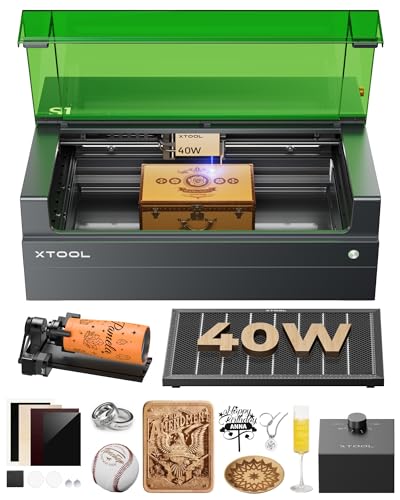
Makers and entertainment enthusiasts looking to fabricate custom desk gear, bespoke controller stands, and intricate gaming accessories often reach a crossroads when evaluating desktop diode lasers. Hardware designed for indoor workspaces must balance raw cutting capability with rigorous safety controls, especially when operating inside a home office, apartment workshop, or shared gaming den. The xTool S1 20W enters this landscape as an enclosed diode laser platform engineered to bring industrial fabrication stability into a secure, enclosed form factor. Rather than leaving open beams and harsh fumes exposed to your living space, this machine seals the fabrication process inside a filtered Class 1 enclosure, offering serious creators a dependable foundation for building personalized peripherals and custom gear.
Selecting the right desktop laser means understanding how laser wattage, positioning mechanics, and software workflows integrate during a complex build. While compact systems like the x tool m1 ultra offer multi-tool craft flexibility, this enclosed unit focuses heavily on high-speed diode execution, structural rigidity, and a generous working capacity. In this review, we benchmark the hardware specifications, examine the real-world utility of its enclosed safety systems, evaluate its patented positioning features, and explain performance differences across power configurations so you can determine whether this setup matches your creative fabrication goals.
What You Get With the xTool S1 20W 135 words

The platform arrives with factory-integrated hardware designed to provide an out-of-the-box fabrication experience across both flat sheet goods and cylindrical objects.
- Fully enclosed Class 1 laser housing with a protective viewing lid that filters 99% of laser light
- Expansive 23.93″ x 15.16″ work bed accommodating oversized sheets and multi-part production runs
- Dedicated rotary bundle accessories engineered for cylindrical engraving projects like custom drinkware and tumblers
- High-velocity motion gantry capable of rapid engraving operations at speeds up to 600mm/s
- Patented Pin-point Positioning technology engineered for flat items and complex 3D curved surfaces
- Automatic focus system coupled with a pre-configured software database of over 400 tested materials
- Built-in five-sensor flame detection array that halts operation automatically upon detecting flame hazards
- Rigid structural chassis manufactured from 3mm aerospace-grade aluminum
- Standard corded electric power adapter and complete data connection cabling
Key Specifications 93 words
Specification Attribute Listing Detail
- Manufacturer
- Makeblock Co., Ltd.
- Part Number / Model
- MXD-K101-001
- Usable Working Bed Area
- 23.93 x 15.16 inches
- Maximum Engraving Velocity
- Up to 600mm/s
- Product Overall Weight
- 86.8 pounds
- Physical Dimensions
- 19.6 x 19.6 x 0.04 inches
- Chassis Material
- 3mm Aerospace-Grade Aluminum Frame
- Safety Certification
- Class 1 Laser Enclosure (Filters 99% of Laser Light)
- Hazard Detection
- Built-in 5 Flame Sensors with Automatic Emergency Stop
- Software Ecosystem
- xTool Creative Space (XCS)
- Power Connection
- Corded Electric
Fields the seller filled in on the Amazon listing (5)
- Color
- Black Rotary
- Size
- 40W
- Dimensions
- 19.6 x 19.6 x 0.0393700787 inches
- Product Group
- Home
- Binding
- Office Product
Class 1 Safety and Workshop Enclosure Protection 258 words
Operating a laser cutter inside a home workspace introduces unique safety concerns that open-frame diode engravers cannot easily address. The xtool s1 class 1 safety rating provides a closed operating environment where stray optical radiation is completely contained. The integrated protective cover filters 99% of laser light wavelengths, enabling you to inspect jobs in progress without needing to wear bulky protective safety goggles. For enthusiasts working in apartments or shared entertainment rooms alongside pets and family members, this enclosure transforms laser fabrication from an isolated garage hazard into an accessible desk-side manufacturing station.
Beyond light filtering, environmental containment plays a vital role in everyday fabrication comfort. The sealed chassis of the xtool s1 enclosed laser engraver actively traps airborne particulates, wood char smoke, and processing noise within the machine envelope, allowing exhaust fans to route fumes outside efficiently. This containment prevents caustic vapor buildup when working with acrylic display cases or laser-engraved leatherette desk pads. Creating custom parts should enhance your workspace environment rather than degrade indoor air quality, and the sealed cabinet provides the structural barrier required to manage exhaust effectively.
Active hazard monitoring provides another critical layer of workshop security during lengthy unattended burns. The machine integrates a network of five dedicated flame sensors distributed across the work envelope. These sensors constantly monitor ambient thermal output and open-flame signatures during deep cutting passes or high-speed rastering. If an unexpected combustion event occurs, the system immediately halts the gantry movement and cuts laser emission to prevent fire spread, providing vital peace of mind when executing dense multi-hour batch runs.
Pinpoint Positioning and Surface Precision 249 words
Accurate material alignment has traditionally been one of the steepest learning curves in desktop laser fabrication, often leading to wasted materials and misaligned graphics. The xtool s1 pinpoint positioning system replaces rough visual guesswork with precise digital edge finding. By mapping reference points directly on your workpiece using the physical laser module, the machine establishes exact boundary coordinates within the design canvas. This precision ensures that text, logos, and intricate cutlines land precisely on pre-cut components, custom keyboard wrist rests, and machined aluminum project panels.
This positioning capability extends beyond flat sheet stock into three-dimensional items with irregular surfaces. The platform measures curved topography across spoons, decorative trays, and complex plates, dynamically calculating focal distance changes across the workpiece. Rather than suffering from blurred edges or uneven power penetration on sloping contours, the system maintains consistent spot sizing up to 118 inches of curved surface reach. While specialized industrial systems like the high-precision f2 ultra uv focus on microscopic marking, this diode setup provides the physical depth tracking needed for practical decorative hardware.
Precision execution also relies heavily on structural stability. Makeblock Co., Ltd. constructed the unit around a rigid 3mm aerospace-grade aluminum frame, bringing the total assembly weight to an imposing 86.8 pounds. When the motion system accelerates to its top velocity of 600mm/s, this structural mass absorbs kinetic energy and prevents micro-vibrations from translating into wavy cutlines or ringing artifacts. The result is razor-sharp vector scoring and clean raster engraving across high-density gaming accessories and custom acrylic displays.
Software Workflow and Material Capabilities 259 words
A capable laser mechanism requires an equally responsive software package to eliminate friction between initial concept and finished product. The xtool creative space software provides an intuitive platform where makers can import vector artwork, establish cut orders, and configure processing layers without an overwhelming initial setup. The software comes loaded with pre-tested parameters covering more than 400 different materials, allowing users to select optimal speed and power combinations with minimal testing. Similar to the user-friendly approach found on machines like the x tool m2 color craft laser cutter and engraver, this software makes complex parameter tuning accessible right out of the box.
Material flexibility is broad across standard creative media, supporting wood, acrylic, leather, coated metals, and stone. When evaluating the xtool s1 cutting capability, the enclosed platform delivers reliable penetration through dense organic materials. The official product specifications note that the 40W configuration of this machine slices through 18mm cherry wood in a single pass. For creators producing custom wooden organizer inserts, layered acoustic panels, or custom desk organization trays, this cutting strength provides clean, square edges that require minimal sanding before final assembly.
The included rotary bundle hardware expands the system into three-dimensional drinkware and gaming gear customization. By linking the rotary tool into the motion control board, the platform accurately drives tumblers, water bottles, and curved cylinders beneath the laser head. Whether you are adding custom esports clan branding to insulated mugs or etching decorative geometric bands around wooden grips, the integration between software motion profiles and rotary mechanics ensures balanced, distortion-free graphics around the entire circumference.
Performance Differences and Power Configuration 223 words
Deciding between laser output levels requires balancing your primary fabrication focus between fine surface engraving and heavy-duty stock separation. When comparing the xtool s1 20w vs 40w options, the higher-wattage module maximizes throughput for thick lumber, allowing rapid, single-pass cuts through dense sheet stock. In contrast, the 20W diode package delivers a smaller, highly concentrated optical focal point, making it exceptionally well-suited for high-resolution graphics, intricate line art, and fine typography on gaming keycaps or personalized desk plaques.
The xtool s1 20w specs provide ample cutting capability for common maker materials, easily parting 3mm to 6mm basswood, craft plywood, and dark acrylics using controlled passes. Because both power configurations share the identical 23.93″ x 15.16″ bed size and 600mm/s motion platform, choosing the 20W version does not compromise your available build volume or overall engraving speed. Makers focusing predominantly on surface personalization, signage engraving, and light architectural models will find the 20W diode output hits a practical sweet spot between laser spot precision and everyday utility.
Reliability is reinforced by extensive manufacturing validation. The manufacturer conducted over 71,830 hours of rigorous testing across the S1 platform, including laser diode aging tests, operational power stability evaluations, and extreme environmental stress testing. This engineering background ensures the motion system, optical alignment, and internal electronics withstand extended burn sessions during weekend maker marathons or continuous small-batch production schedules.
xTool S1 20W Pros and Cons 57 words
Pros
Pros
- Enclosed Class 1 design filters 99% laser light
- Rapid engraving speed up to 600mm per second
- Patented Pin-point Positioning maps curved 3D surfaces
- Heavy 3mm aerospace-grade aluminum structural frame
- Integrated five-sensor flame detection with automatic shutoff
Cons
- Substantial 86.8-pound overall unit weight
- Requires dedicated desk space and external exhaust setup
- Listing does not specify pass-through door dimensions
Is the xTool S1 20W Worth It 236 words
Evaluating whether the xtool s1 laser cutter justifies a spot in your workshop comes down to your safety requirements, available workspace, and intended project scope. If you are an enthusiast maker building custom gaming gear, tailored electronics enclosures, or personalized entertainment accessories inside a living area, the enclosed architecture alone solves the primary hurdles of smoke management and laser safety. Having Class 1 certification and automatic flame detection transforms what used to be an intimidating workshop tool into an approachable desktop appliance.
For dedicated fabricators who prioritize high engraving detail, clean software workflows, and the ability to engrave cylindrical tumblers out of the box, the system delivers immense utility. The combination of pinpoint surface registration, automatic focus routines, and the spacious 23.93″ x 15.16″ bed gives you ample room to manufacture full-scale mechanical keyboard cases, bespoke tabletop game boards, and custom wall displays without feeling constrained by typical small-format desktop work areas.
However, this machine is not built for light portability or casual weekend packing. Weighing 86.8 pounds and demanding a sturdy, dedicated desk, it requires permanent workshop space with dedicated exhaust routing. If your creative focus requires cutting through very thick hardwood slabs in rapid single passes on a daily basis, opting for the higher-output 40W module may be the better choice. But for creators who want unmatched safety, ultra-fine engraving precision, and dependable cutting across standard maker stock, this enclosed setup stands out as an exceptional desktop platform.
Other Options to Consider 164 words
130 x 130mm Working Area: The ACMER S1 Laser Engraver Machine provides a 2500mW laser output and a compact desktop design. This open-frame alternative suits crafters working in tiny spaces who only need light engraving on small craft items and do not require heavy structural frames, large work beds, or fully enclosed Class 1 safety housings.

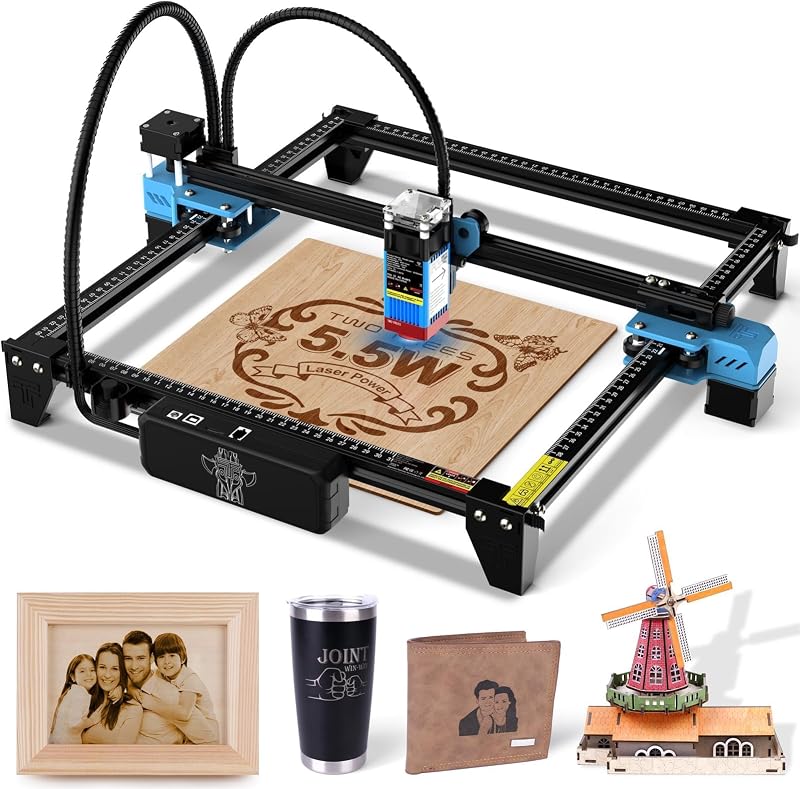
Laser Cutter: The Twotrees TTS-55 Pro Laser Engraver delivers a 5500mW laser output across a 300 x 300 mm work area with a 0.08mm laser spot. This open-frame unit is better suited for budget-conscious hobbyists looking for a traditional DIY kit to mark wood, acrylic, and metal without integrated smoke enclosures or flame-sensing safety arrays.
BlazeX M3 10W Laser Engraver: The BlazeX M3 10W Laser Engraver Machine features 0.01mm ultra-precision, a Class 1 protective enclosure, and an included honeycomb bed. This machine suits beginner creators who want an enclosed, safety-certified desktop engraver with intermediate diode cutting power for small decorative crafts and leather accessories.

FAQ 294 words
What materials can the xTool S1 laser cutter process?
The system is engineered to engrave and cut a broad selection of standard workshop materials. Supported materials include wood, acrylic, leather, coated metals, and stone. It also processes cylindrical drinkware using the included rotary accessories. For specific materials, xTool Creative Space provides pre-tested parameters covering more than 400 material profiles.
Does the xTool S1 enclosed laser engraver require safety goggles?
No, standard operation does not require eye goggles because the machine features a fully enclosed Class 1 certified housing. The integrated top lid filters 99% of laser light wavelengths, allowing you to view and monitor the engraving and cutting process safely from the outside under normal operating conditions.
How does the xTool Creative Space software manage focus and positioning?
The platform utilizes an automatic focus mechanism alongside patented Pin-point Positioning technology. By registering multi-point coordinates directly on the workpiece, the software aligns vector artwork precisely with both flat surfaces and curved 3D objects, automatically adjusting vertical focal distances to prevent graphic distortion.
What are the primary differences in the xtool s1 20w vs 40w choice?
The primary difference lies in the maximum optical power output and focal spot characteristics. The 40W configuration provides maximum cutting depth, slicing through 18mm cherry wood in a single pass for heavy woodworking. The 20W configuration provides a finer laser spot for high-resolution vector engraving and detailed graphic marking, while still comfortably cutting standard thin plywood and acrylic sheets.
Can the machine engrave curved objects like tumblers?
Yes, the included rotary bundle hardware allows you to secure and rotate cylindrical items directly beneath the laser gantry. Coupled with the system’s 3D curved surface mapping capabilities, you can etch continuous logos, typography, and complex patterns around tumblers, mugs, and decorative cylindrical items.
The other listings this review names
-

ACMER S1 Laser Engraver Machine, 2500mW Lazer Cutter for Wood and Acrylic
8.8/10 Our score 5 spec fields
-

Twotrees TTS-55 Pro Laser Engraver 5500mW Laser Engraving Machine
9.2/10 Our score 4 spec fields
-